validate command
The validate command allows you to perform a validation procedure and compare transformed data.
Below is a list of all supported flags for the validate command:
Usage:
  greenmask validate [flags]

Flags:
      --data                             Perform test dump for --rows-limit rows and print it pretty
      --diff                             Find difference between original and transformed data
      --diff-mode string                 How to show the diff (only with --data and --diff). Possible values [values|summary]. summary prints per-column counts of changed rows and no original or transformed value (default "values")
      --diff-unchanged-threshold float   With --diff-mode=summary, warn when a transformed column keeps more than this percentage of its non-NULL values (0-100, 100 turns the warning off). Counts cover --rows-limit rows only (default 90)
      --format string                    Format of output. possible values [text|json] (default "text")
      --rows-limit uint                  Check tables dump only for specific tables (default 10)
      --schema                           Make a schema diff between previous dump and the current state
      --strict                           Exit with non-zero code if there are any validation warnings (warnings-as-errors)
      --table strings                    Check tables dump only for specific tables
      --table-format string              Format of table output (only for --format=text). Possible values [vertical|horizontal] (default "vertical")
      --transformed-only                 Print only transformed column and primary key
      --warnings                         Print warnings
Validate command can exit with non-zero code when:
- Any error occurred
- There is a validation warning with severity
"error" - Validate was called with
--strictflag and there are any unresolved warnings (warnings-as-errors) - Validate was called with
--schemaflag and there are schema differences - Validate was called with
--strictand--diff-mode=summaryand the summary has an unresolved column warning
The --warnings flag only controls printing of warnings — it does not affect the exit code. In strict mode
warnings are always printed regardless of --warnings, and warnings whose hash is listed in resolved_warnings are
not treated as failures.
These non-zero exit codes let CI/CD pipelines stop on problems — particularly useful with --schema or --strict,
which guard against data leakage on schema changes and enforce a clean validation result.
You can use the --table flag multiple times to specify the tables you want to check. Tables can be written with
or without schema names (e.g., public.table_name or table_name). If you specify multiple tables from different
schemas, an error will be thrown.
To start validation, use the following command:
greenmask --config=config.yml validate \
  --warnings \
  --data \
  --diff \
  --schema \
  --format=text \
  --table-format=vertical \
  --transformed-only \
  --rows-limit=1
2024-03-15T19:46:12+02:00 WRN ValidationWarning={"hash":"aa808fb574a1359c6606e464833feceb","meta":{"ColumnName":"birthdate","ConstraintDef":"CHECK (birthdate \u003e= '1930-01-01'::date AND birthdate \u003c= (now() - '18 years'::interval))","ConstraintName":"humanresources","ConstraintSchema":"humanresources","ConstraintType":"Check","ParameterName":"column","SchemaName":"humanresources","TableName":"employee","TransformerName":"NoiseDate"},"msg":"possible constraint violation: column has Check constraint","severity":"warning"}
The validation output will provide detailed information about potential constraint violations and schema issues. Each
line contains nested JSON data under the ValidationWarning key, offering insights into the affected part of the
configuration and potential constraint violations.
{
  "hash": "aa808fb574a1359c6606e464833feceb", // (13)
  "meta": { // (1)
    "ColumnName": "birthdate", // (2)
    "ConstraintDef": "CHECK (birthdate >= '1930-01-01'::date AND birthdate <= (now() - '18 years'::interval))", // (3)
    "ConstraintName": "humanresources", // (4)
    "ConstraintSchema": "humanresources", // (5)
    "ConstraintType": "Check", // (6)
    "ParameterName": "column", // (7)
    "SchemaName": "humanresources", // (8)
    "TableName": "employee", // (9)
    "TransformerName": "NoiseDate" // (10)
  },
  "msg": "possible constraint violation: column has Check constraint", // (11)
  "severity": "warning" // (12)
}
- Detailed metadata. The validation output provides comprehensive metadata to pinpoint the source of problems.
- Column name indicates the name of the affected column.
- Constraint definition specifies the definition of the constraint that may be violated.
- Constraint name identifies the name of the constraint that is potentially violated.
- Constraint schema name indicates the schema in which the constraint is defined.
- Type of constraint represents the type of constraint and can be one of the following:
* ForeignKey* Check* NotNull* PrimaryKey* PrimaryKeyReferences* Unique* Length* Exclusion* TriggerConstraint
- Table schema name specifies the schema name of the affected table.
- Table name identifies the name of the table where the problem occurs.
- Transformer name indicates the name of the transformer responsible for the transformation.
- Name of affected parameter typically, this is the name of the column parameter that is relevant to the validation warning.
- Validation warning description provides a detailed description of the validation warning and the reason behind it.
- Severity of validation warning indicates the severity level of the validation warning and can be one of the
following:
* error* warning* info* debug
- Hash is a unique identifier of the validation warning. It is used to resolve the warning in the config file
A validation warning with a severity level of "error" is considered critical and must be addressed before the dump operation can proceed. Failure to resolve such warnings will prevent the dump operation from being executed. See Validation errors and warnings.
2024-03-15T19:46:12+02:00 WRN Database schema has been changed Hint="Check schema changes before making new dump" PreviousDumpId=1710520855501
2024-03-15T19:46:12+02:00 WRN Column renamed Event=ColumnRenamed Signature={"CurrentColumnName":"id1","PreviousColumnName":"id","TableName":"test","TableSchema":"public"}
2024-03-15T19:46:12+02:00 WRN Column type changed Event=ColumnTypeChanged Signature={"ColumnName":"id","CurrentColumnType":"bigint","CurrentColumnTypeOid":"20","PreviousColumnType":"integer","PreviousColumnTypeOid":"23","TableName":"test","TableSchema":"public"}
2024-03-15T19:46:12+02:00 WRN Column created Event=ColumnCreated Signature={"ColumnName":"name","ColumnType":"text","TableName":"test","TableSchema":"public"}
2024-03-15T19:46:12+02:00 WRN Table created Event=TableCreated Signature={"SchemaName":"public","TableName":"test1","TableOid":"20563"}
Example of validation diff:
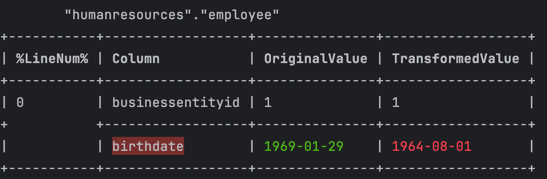
The validation diff is presented in a neatly formatted table. In this table:
- Columns that are affected by the transformation are highlighted with a red background.
- The pre-transformation values are displayed in green.
- The post-transformation values are shown in red.
- Colors are printed only when stdout is a terminal. Set
NO_COLOR=1to turn them off, orFORCE_COLOR=1to keep them when the output goes to a pipe or a file, for example| less -R. - The result in
--format=textcan be displayed in either horizontal (--table-format=horizontal) or vertical (--table-format=vertical) format, making it easy to visualize and understand the differences between the original and transformed data.
The whole validate command may be run in json format including logging making easy to parse the structure.
greenmask --config=config.yml validate \
  --warnings \
  --data \
  --diff \
  --schema \
  --format=json \
  --table-format=vertical \
  --transformed-only \
  --rows-limit=1 \
  --log-format=json
The json object result
- The validation warning
- Schema diff events
- Transformation diff line
{
  "level": "warn",
  "ValidationWarning": {
    "msg": "possible constraint violation: column has Check constraint",
    "severity": "warning",
    "meta": {
      "ColumnName": "birthdate",
      "ConstraintDef": "CHECK (birthdate >= '1930-01-01'::date AND birthdate <= (now() - '18 years'::interval))",
      "ConstraintName": "humanresources",
      "ConstraintSchema": "humanresources",
      "ConstraintType": "Check",
      "ParameterName": "column",
      "SchemaName": "humanresources",
      "TableName": "employee",
      "TransformerName": "NoiseDate"
    },
    "hash": "aa808fb574a1359c6606e464833feceb"
  },
  "time": "2024-03-15T20:01:51+02:00"
}
{
  "level": "warn",
  "PreviousDumpId": "1710520855501",
  "Diff": [
    {
      "event": "ColumnRenamed",
      "signature": {
        "CurrentColumnName": "id1",
        "PreviousColumnName": "id",
        "TableName": "test",
        "TableSchema": "public"
      }
    },
    {
      "event": "ColumnTypeChanged",
      "signature": {
        "ColumnName": "id",
        "CurrentColumnType": "bigint",
        "CurrentColumnTypeOid": "20",
        "PreviousColumnType": "integer",
        "PreviousColumnTypeOid": "23",
        "TableName": "test",
        "TableSchema": "public"
      }
    },
    {
      "event": "ColumnCreated",
      "signature": {
        "ColumnName": "name",
        "ColumnType": "text",
        "TableName": "test",
        "TableSchema": "public"
      }
    },
    {
      "event": "TableCreated",
      "signature": {
        "SchemaName": "public",
        "TableName": "test1",
        "TableOid": "20563"
      }
    }
  ],
  "Hint": "Check schema changes before making new dump",
  "time": "2024-03-15T20:01:51+02:00",
  "message": "Database schema has been changed"
}
{
  "schema": "humanresources",
  "name": "employee",
  "primary_key_columns": [
    "businessentityid"
  ],
  "with_diff": true,
  "transformed_only": true,
  "records": [
    {
      "birthdate": {
        "original": "1969-01-29",
        "transformed": "1964-10-20",
        "equal": false,
        "implicit": true
      },
      "businessentityid": {
        "original": "1",
        "transformed": "1",
        "equal": true,
        "implicit": true
      }
    }
  ]
}
Validation errors and warnings
validate and dump check the configuration in the same way, against the live database schema, before
any data is read. Each problem is a validation warning with one of these severities:
error— the configuration cannot be applied. It is fatal:dumpaborts andvalidateexits with a non-zero code.warning,info,debug— a hint, for example a possible constraint violation. It never stopsdump. With--strict, an unresolvedwarningmakesvalidateexit with a non-zero code.
Greenmask does not skip a transformer it cannot apply. A table, transformer, parameter or column in the
transformation config that does not exist is an error:
| Problem | msg | Main meta keys |
|---|---|---|
| Table does not exist | table is not found | Schema, TableName |
| Unknown transformer name | transformer not found | TransformerName |
| Unknown parameter name | received unknown parameter | ParameterName |
Column parameter (such as column) names a missing column | column does not exist | ColumnName, ParameterName |
Dynamic parameter column names a missing column | column does not exist | DynamicParameterSetting: column, ParameterName |
Cmd transformer columns item names a missing column | column not found | ColumnName, ElementNum |
For example, a RandomEmail transformer on a column email that the public.users table does not have:
2026-10-25T10:12:03+02:00 ERR ValidationWarning={"hash":"","meta":{"ColumnName":"email","ParameterName":"column","SchemaName":"public","TableName":"users","TransformerName":"RandomEmail"},"msg":"column does not exist","severity":"error"}
validate prints the same line with the warning hash filled in. If a table in the config is missing, only the
missing tables are reported: the transformers are checked on the next run, after the tables are fixed. Otherwise
error warnings from all tables and transformers are reported in one run.
How the two commands handle the result:
dump | validate | |
|---|---|---|
error warnings | Logged, then the dump stops with context error: fatal validation error before the schema is dumped. Nothing is written to storage. | Logged, then exits with code 1 and fatal validation error. |
warning, info, debug warnings | Not printed, the dump goes on. | Printed with --warnings or --strict. Exit code 1 only with --strict and only for unresolved warning. |
validate.resolved_warnings | Not used. | Hides the listed warnings. An error hash in the list fails validate with warning with hash ... cannot be excluded because it is an error. |
| Tables checked | Every table in dump.transformation. | The --table tables if set, otherwise every table in dump.transformation. |
So run validate without --table to see every error that would stop dump.
A column in a when condition is not checked during validation. If record.<column> or raw_record.<column> names
a column that does not exist, the condition fails on the first row of the table with
error evaluating when condition: unable to evaluate when condition: invalid operation: cannot call nil, and dump
stops in the data stage. validate finds it only with --data and only if the table has rows.
Summary diff
--diff prints original values next to transformed ones. That is fine against a staging copy, but not where
production data may be read and must not be shown: a CI job whose logs are kept, a shared terminal, or an AI agent's
transcript. --diff-mode=summary compares the same rows and prints counts only, per table and column. It prints
no original or transformed value and no primary key.
greenmask --config=config.yml validate \
  --data \
  --diff \
  --diff-mode=summary \
  --rows-limit=1000
	"humanresources"."employee" (290 rows compared, values not shown)
+------------------+-------------+---------+-----------+------------+-------------+--------------------------------------------------+
|      Column      | Transformed | Changed | Unchanged | NULLs kept | Unchanged % |                      Warning                     |
+------------------+-------------+---------+-----------+------------+-------------+--------------------------------------------------+
| businessentityid | no          |       0 |       290 |          0 |       100.0 |                                                  |
| birthdate        | yes         |     290 |         0 |          0 |         0.0 |                                                  |
| loginid          | yes         |      12 |       278 |          0 |        95.9 | transformed column is unchanged in too many rows |
+------------------+-------------+---------+-----------+------------+-------------+--------------------------------------------------+
For each column:
- Transformed — whether a transformer in the config affects the column.
- Changed, Unchanged — rows where the value did or did not change.
- NULLs kept — rows where the value was
NULLbefore and after. These are left out of the unchanged ratio, because keepingNULLis the usual behaviour of most transformers. - Warning:
transformed column is unchanged in too many rows— a transformed column kept more than--diff-unchanged-thresholdpercent (default90) of its non-NULLvalues. This usually means a missed or no-op transformer, for example aReplacewith a value most rows already have. Set the threshold to100to turn the warning off. The warning is a hint, not a proof: a transformer with few possible outputs keeps many values by design.RandomBoolkeeps about half of them,RandomChoicewith two values the same, and a small-rangeNoiseIntorNoiseDatecan keep more. Small--rows-limitsamples make the ratio noisy too.column changed but no transformer affects it— the column changed, but no transformer in the config targets it.
Each column warning is also a validation warning with a hash, printed with --warnings or --strict like any other
warning. Its meta.WarningType is UnchangedRowsPercentageThresholdExceeded or UntransformedColumnChanged. With
--format=json the hash is also in the column's hash field; with --format=text it is only in that log output. The
hash covers the message, severity, warning type, schema, table and column but not the row counts, so it stays the
same when the counts change. Add it to validate.resolved_warnings to accept the warning, for example for a
RandomBool column:
validate:
  resolved_warnings:
    - "e2550a86b34552c742bc1dafffa632de"
With --format=json each table is one JSON object:
{
  "schema": "humanresources",
  "name": "employee",
  "diff_mode": "summary",
  "rows": 290,
  "columns": [
    {
      "name": "loginid",
      "transformed": true,
      "changed": 12,
      "unchanged": 278,
      "nulls_kept": 0,
      "unchanged_ratio": 0.9586206896551724,
      "warning": "transformed column is unchanged in too many rows",
      "hash": "e2550a86b34552c742bc1dafffa632de"
    }
  ]
}
Things to know:
- The summary needs
--diff:--datawith--diff-mode=summaryand without--diffis an error, because plain--dataprints every value. Without--datadiff_modeis ignored, sodiff_mode: summarycan stay in the config. - The counts cover the
--rows-limitrows that validate dumps (default10). Use a larger--rows-limitfor a ratio you can trust. - With
--transformed-only, the summary lists transformed columns and any column with an unresolved warning.--table-formatdoes not apply: the summary has one layout. - A transformer with a
whencondition counts as affecting the column in every row, so rows the condition skips count as unchanged. - With
--strict, any column warning not listed inresolved_warningsmakes validate exit with a non-zero code. - Resolved warnings are not shown in the summary table or json, like any other resolved warning. The column itself and its counts stay.
--diff-unchanged-thresholdis checked only with--diff-mode=summary.